Friday, January 25, 2019

Thing 07: Presentation Tools


Thing 07: Presentation Tools

This weeks resources were engaging. We’ve come a long way since PowerPoint!

Before I go any further, I have a confession and I hope that it’s okay that I completed the wrong  assignment that was geared towards this module. Last week, when I looked at Thing 06: Digital Storytelling, I also looked at Thing 07:Presentation Tools since I was unsure how they were considered "different". I guess I had both tabs open at the same time and was looking at the resources for both weeks, since I had an “Oh crap!” moment when I went to complete this modules reading and resources. I meant to submit a Powtoon for my assignment for Thing 06 Digital Storytelling and submit my Adobe Spark presentation for Thing 07 Presentation Tools. I had circled those two tools as ones that I was most interested in learning about….but submitted them in the wrong order. If it’s okay, since I got really familiar with Adobe Spark last week, I’d like to discuss Powtoon this week as well as other Presentation tools that I found helpful in the module..

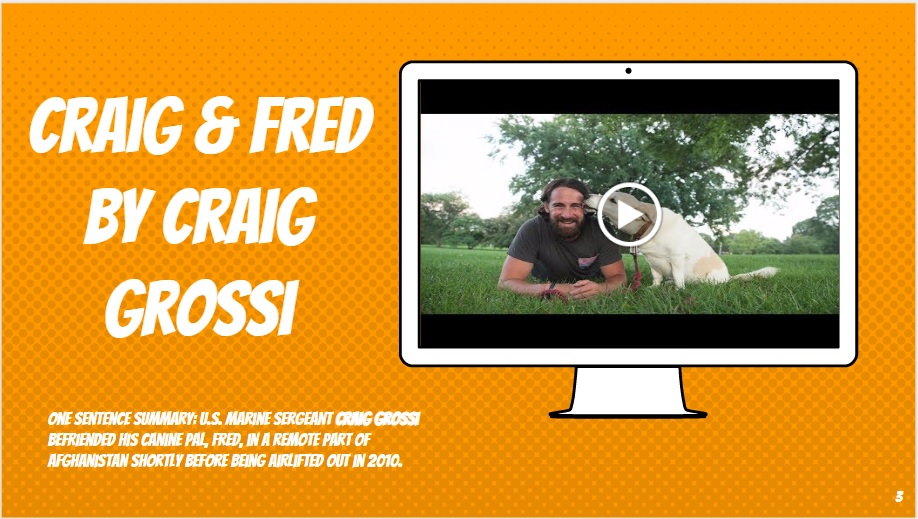
I am a HUGE user and really enjoy Google Slides. I find Slides to be very intuitive and user friendly. One of the coolest things that I’ve recently become addicted to when it comes to Google Slides is a website called Slides Carnival. This website is a template repository and allows you to freely download really cool pre designed slides. However, what was transformative for me, was how the design of the slides made me rethink what is possible within a presentation. For example, in one of the templates, I encountered a graphic of a Mac computer that allowed for a slick insertion of a YouTube video. I use this template for book talks and include the title of a book, the author’s name and a one sentence summary along with a YouTube promotional video (book trailer) of the story. Looks like this:


I was a huge Prezi fan when I taught research in elementary school. Students made a lot of effective and thoughtful presentations using the tool. I really like that Prezi made kids think about their work being non-linear. I challenged kids to think about main idea and supporting details…..much like a concept map. A recent criticism that was brought to my attention was that Prezi is not ADA compliant? A few other librarians that I know refuse to use the tool because of that :/

Well, my time spent with PowToon was interesting. I experienced the gamut of emotions while using it: excited, pleased, frustrated, hating Adobe Flash, even more frustrated with the paywall then eventually satisfied with my learning & creation.

In the beginning, I was overwhelmed by all of the choices in templates and the amount of possibility for design. Eventually I settled in and went with a template that was aesthetically pleasing. I had a decent experience assembling my presentation - some things are intuitive - others can be a royal pain. I had no problem placing objects out onto slides and inserting text. A few times when slides got graphically intense, Adobe Flash crashed and gave me that old time Windows 98 panic moment as to whether or not I lost my entire project. Luckily, I had remembered to save along the way and didn’t lose my work to a crash. Adobe Flash crashed two more times along the way during graphically intense moments but for the most part it was stable.

The biggest pain for me was figuring out the timing of objects within my slides. It took me a good 20 minutes of dragging and tinkering to figure things out. I found myself wishing the timeline was a little bit more intuitive, like iMovie. I found myself going to help manual for things along the way and resourcing myself with PowToon YouTube videos.

But again, the aggravation was worth it. I have A LOT more to learn but ultimately PowToon is a practical tool and I can see myself using it with middle school kids. It’s the right amount of a technical challenge and has the resources for kids to be creative. It’s also useful for professional looking presentations or for integration onto a classroom website.

https://www.powtoon.com/c/c6NKq4ZSKHW/1/m

Good resources in this module, they all challenged me to think of creative applications and uses with students.

Thursday, January 24, 2019

Thing 06: Digital Storytelling

Thing 06: Digital Storytelling

I was really excited to tackle the reading and activities for this module. I’ve always been a bit of a video nerd. I remember spending hours with the original iMovie, making too many videos to name and filling up my hard drive with data intensive files.

There were some tools in the module that I’ve heard of and have used in my teaching, like Google Slides, Powtoon & Microsoft Sway. Windows Movie Maker was one that I really disliked but was forced to use when I first started teaching. Most of the other tools were brand new to me. It was great to see a glimpse of effective unit design with a tool, get examples of best practice, and see what other educators are doing with their students. We’ve come a long way from using PowerPoint as the ONLY tool that’s taught to present & communicate ideas.

I spent a majority of my time learning how to use Adobe Spark. I’ve always been a huge fan of the Adobe suite - most of their software is uber sophisticated and expensive - but I appreciate the nuance involved in being creative and doing something well with digital media.

My overall experience with Spark Video was enjoyable. I found the interface relatively easy to use and the learning curve wasn’t all that steep. I quickly found that my video was only good as the media and pictures that I had access to. That means either photos taken with a camera or phone; OR importing photos off the Internet. Luckily, I’ve been keeping a few pictures on my phone of the work that I’ve been doing to the physical space in the Library. As I began to assemble my video, I realized, “I DON'T HAVE ENOUGH PICTURES!!! WHY DIDN’T I TAKE MORE??”

I really liked the simplicity of using the tool, selecting a theme and assembling the media and effects was simplistic….limited options = easier to use. I LOVED the option to add music to As I built my creation, I couldn’t help but think how easy this would be to use with my 6th and 7th grade middle school kids. It will definitely be an option as I offer such services to classroom teachers. I also think that these type of quick videos might be a great way for me to document my own work/professional development & learning.

My video lives here: https://spark.adobe.com/video/yRc3L88qGWSRt

I’m really intrigued by the ability to create newsletters. As a librarian, I am constantly trying to find new ways to reach out to and communicate with teachers

On a side note - since my school is a Google for Education organization, I noticed how nicely Adobe Spark integrates with my files from Google Drive. Importing photos from the cloud was super convenient.

I can see myself returning to this module for inspiration, as needed!

Monday, January 14, 2019

Thing 05: Audio Tools

Thing 05: Audio Tools

I was really excited to tackle the reading and resources in this module. On a professional level, I am trying to overhaul a back library office for adults, and turn it into a production studio for kids. Although a major focus of the studio will be video work, a fairly large minority of the studio will be for recording audio. Just this past Friday I received my first shipment of equipment for the studio - and the very first thing that I received was audio equipment. I have dreams of students being able to own the studio and produce meaningful content. I also have dreams of teachers rethinking their assignments to be more 21st century, and for them to include digital components to their learning goals for students.

I’ve been having students help me unbox the equipment and test it out. Everyone wants their chance to be behind the microphone and to make their very own recording. Here’s a funny one, under ten seconds, that was made recently. I’ve entered into preliminary conversations with students about creating our own school-wide podcast channel. This has elicited some really fun conversations about content and hilariously themed shows. I am going to have to take a lot of time and do some fairly intensive research about school podcasts and everything needed to make them. There’s also the 800 pound gorilla in the room when it comes to producing content with minors under 13 and posting their work to the web. This is an administrative conversation/consideration that needs to happen as well.

My familiarity with audio from years back is using the software Audacity. Shockingly over time, Audacity is still around and is just plain user friendly and easy to use. Tangentially related, when I was a first & second year librarian I had students create audio book reviews. Then each book review mp3 file was linked into the Library catalog. Students could listen to each other’s reviews and I was able to expand the number of audio reviews into the 200-300 range over the span of a few years. It was one of the most satisfying projects that I’ve ever worked on with students - there was a ton of value in it and the audio book reviews had a positive impact over time. As type this and reflect on the project, I’m not sure why I stopped doing this with kids. I guess that I just got bored with it over time and sought a different challenge. 

I really like Flipgrid as a tool for students to capture audio/video. The website is really easy to use and allows anyone with a device to make a contribution. I’ve been impressed with what I see come out of 1st & 2nd grade classrooms.

I am most intrigued by Synth. It looks like a full audio version of FlipGrid. If I ever get my recording studio running at full steam, I can see Synth as a way to have teachers organize & archive class audio content and have students listen and respond to each other's work.

I was really engaged with all of the resources from this module. They were incredibly timely and I will have this page bookmarked as I move forward with my dream of building a production studio for kids. It’s going to be one thing to purchase the equipment and have the capacity to record - but the superior piece is to have the instructional resources and knowledge to empower students to create engaging and meaningful content.

Tuesday, January 1, 2019

Thing 4: Twitter, Facebook and Personal Learning Networks

Thing 4: Twitter, Facebook and Personal Learning Networks 

I try not to spend a ton of time on Facebook so it’s not the best way for me to build a personal learning network. I do pop into some Library & Reading related Facebook groups that I’ve joined but I find the content to be mostly reminders or summaries of conference & events. I rarely see a ton of interaction or thoughtful discourse….it’s mostly perfunctory. Believe it or not, one of the best ways that I’ve seen public schools use Facebook is through their PTA chapter. Almost every parent has a personal Facebook account and it’s incredibly easy to have them like the PTA’s page and announcements & fundraising messages reach their audience. I saw a fairly big increase in parent engagement when my old elementary school decided to use Facebook as a means to reach a wider audience. 

I’m a huge Twitter as a personal learning network fan. I’ve had an account for awhile now and have spend oodles of time building and culling from my network. Right now, I’d say that I have ⅓ of the people that I am following are friends for fun, ⅓ of those that I am following are for my hobbies, and ⅓ of those that I am following are educators & school librarians.

I’ve spent a great deal of time managing my network, it’s an active process to figure out who is tweeting out stimulating & engaging content rather than just crap! I’ve found a lot of value in following live tweeting events. I’ve been involved in #tlchat & multiple educational conferences that provided hashtags as a way to aggregate content and acquire knowledge from sessions that I was not able to attend. Following hashtags is kind of a way to hitchhike your way through a conference. 

I was really intriguing with the website paper.li . This service lets you build a newspaper-esque layout of twitter content based on your interests. I found it cool that I didn't have to scroll through a ton of junk in my feed in order to get to the articles about particular topics. I was kind of annoyed that I had to make seperate papers for each topic. As a personal preference, I wouldn't mind mashing up a couple of topics and having them appear in ONE feed - sort of like the app Flipboard. Nevertheless, I liked paper.li’s usability and will use it moving forward with a couple of school library & education based topics that interest me. 

One thing that’s slowed my roll on twitter when using my Macbook Pro, is that the app store recently took away the native Twitter client. It’s still available for mobile - I use it daily and love it. However, I’ve had to resort to using either Tweetdeck or just logging into Twitter with a web browser. I don’t dislike either choice - they are both a serviceable plan B, but for speed and efficiency, I liked it when Twitter looked the same on my phone as it did on my laptop. Perhaps this complaint is just me getting old :)

Monday, December 31, 2018

Thing 03: Photo Fun


Thing 03: Photo Fun

This topic is a fun one and there are a ton of possibilities when it comes to creating and using images in education. There was a lot in this module, from the nuts and bolts of digital tools to the thoughtful instructional use of digital images.

I am an enormous fan of Flickr. I thought that they were on the cutting edge of image hosting back in the early 2000’s. Around 2010, I was able to secure a high quality Canon D-SLR camera for my elementary school. Since I was the webmaster, I made it a personal goal to take photos of events in classrooms and other school related events away from school. I would use Flickr as a place to organize & host all of the albums. For about $20.00 per year, I was allowed to upload as many photos as needed - storage was unlimited. What’s more is that Flickr provided a great HTML embed code & widget, where I could quickly upload an album to the school’s website. Parents & administration LOVED this! ((P.S. The Halloween photos ALWAYS get the most views and likes))

Outside of Flickr, I respect what Google Photos has to offer. Personally, I am in the Apple/iOS environment, so I don’t take full advantage of Google’s image backup & hosting capabilities. My girlfriend recently switch over to Google Fi for her cellular service and uses Google Photos to back up her camera roll and free up space on her device. It works seamlessly.

In regards to social tools, I love the way that I see Instagram used to promote services, events and books in school libraries. There are some amazing Instagram school library accounts that I follow that do an incredible job posting ‘books of the day/week/month’ and trying to engage with their followers - whether they are students or parents. Some of my favorites are:


https://www.instagram.com/epicreads/


https://www.instagram.com/mrschureads/?hl=en


https://www.instagram.com/dianalrendina/


https://www.instagram.com/teensatvpl/?hl=en


https://www.instagram.com/thedaringlibrarian/?hl=en


Tony Vincent is amazing, in many aspects of tech in education - he is one of my mandatory follows! Almost everything he publishes and promotes is gold.

As a middle school librarian, one of my most necessary lessons is the thoughtful use of digital photographs. Way too many students are comfortable going to Google, right clicking & saving a photo, then inserting it into their project. They are totally unaware that they could be STEALING someone else property/intellectual property! Beyond that, many teachers reinforce this bad habit and encourage students to just go to Google if they are in need of a photo. I often spend a ton of time on teaching the Creative Commons vs. Copyright and the ethical downloading of photos. Kids practice using alternate websites like Wikimedia, CC Search, and Pixabay in front of me but I know that Googling will always be the easier option for them and it’s tough to police!


My sense is that teachers need to thoughtfully create assignments that encourage students to prove that they are using copyright friendly images. Further, I can’t help but share my frustration how in the younger grades, these bad habits are built and then continued throughout one's educational career and onto adulthood. I really feel like it’s my responsibility to help teach this content and help students understand that they have options. Perhaps there’s no better way for students to learn this is to have one of their OWN photos used without permission. I’d be curious to learn if any other educators have a unit or experiential ways to walk students through this content.

**All photos in this post were some of my favorite student gifts over the years of being an elementary school librarian. I posted these to Instagram over the years to capture the memories**

Thursday, December 27, 2018

Thing 2: Student Blogging & Writing

Blogging seems like such an OLD technology even though it has only been around for about two decades. When I perused this assignment and clicked through the resources, my mind immediately went, “been there, done THAT!” I was about to skip this module altogether when my brain went to a completely different warm and fuzzy memory about all of the good things that came to me from blogging - both personally & professionally. I blogged as a first year school librarian with a running commentary and reflections on daily life at school. I now look back and see how critical that process was to my own growth as a teacher and professional. It also provided me with some levity, and an outlet, to run with ideas. I was eventually solicited by School Library Journal to write an article with advice to other new School Librarians. It ran in the September 2006 issue, and I was published in the same issue as one of my heroes, Stephen Krashen.

I think, at its core, blogging is an extremely healthy exercise to practice writing and reflecting. It’s my opinion that all students that are learning to practice their writing and thinking skills would benefit greatly from attempting to blog.

From the resources listed in the module, two nontraditional tools seemed to catch my attention. In thinking about implementation & application for me at the middle school level I was very intrigued by Google Docs & Flipgrid.

First, in thinking about Google Docs, I see a ton of potential in students being able to compose their work in a simple word document/ text editor and then have the capability to share at different levels - either with peers, teachers, or publish to the WWW. On the surface, Google Docs might seem like a laughably pathetic and unsexy blogging tool, but I think there is a lot of power in its simplicity. As a School Librarian, I love how I could be invited into a teacher’s Google Classroom and add to the conversation about literature, information literacy or tech. Since my district is a Google for Education school, all students have access to the Google Tools suite. There are so many simple ways to have students microblog using Google Docs.

Secondly, my latest crush has been on the tool Flipgrid. This is a relatively new one to me, and I think it is considered to be more of a vlogging resource.  Nearly every device these days comes with a camera. What an amazing way for kids to use video to reflect on learning prompts - whether it's writing or any other critical thinking assignment! I’ve used Flipgrid once before and was impressed that it is fairly low tech. I had the most trouble keeping my recorded message under the teachers request of 90 seconds. In looking at the Flipgrid website, it looks like the video length range is from 15 seconds to 5 minutes. I had written a small list of bullet points to help guide me when it was time to speak in front of the camera, but even then it was WAY harder than I thought to record myself. It took at least 15 takes for me to capture something acceptable. I know students would probably be less analytical than I was in recording but I thought the entire process was valuable practice for how make a succinct statement and defend an opinion.

In closing, I still think that there is a lot of merit in having students as bloggers. They might pushback or dislike blogging exercises at first, but with electronic journaling, it’s easy to measure growth over time. It seems like this “old” technology is still around for a reason. I’m impressed with what’s still available and how the blogging space has matured over time.

Sunday, December 9, 2018

Thing 1: Getting Started

Howdy All!

I am creating and posting to my 2nd career blog! Back when blogging was all the rage back in 2005, I had a weblog about the musings and commentary of being a first year school librarian. It feels like an eternity ago, but as I look back, I can't help but reminisce how healthy it was for me to be actively reflecting on my practice during my first year of teaching.  I had no clue of what I was doing, but I had a lot of energy and was excited to be a part of the profession. If I could only go back and teach that 22 year old kid a thing or two!

My name is Justin Ashworth and this is my fourteenth year in school librarianship. This is my first year as a middle level librarian at Ray Middle School in Baldwinsville, NY. Prior to this new adventure, I spent thirteen years as librarian at McNamara Elementary School.

I am going through the growing pains of transitioning to a new level. I'll start off by acknowledging that I am basically a first year teacher all over again! The transition has been tough and I am learning all of the nuances of being a middle school librarian - completely different from the elementary level! The first 50 days have been eye-opening and taxing.....SO MUCH TO LEARN!! I fall asleep as soon as my head hits the pillow!

I am motivated to take this class for a number of reasons. My primary reason is my shift to a new grade band. I realize that I need to begin examining the use of instructional technology in a middle level context. While I was fairly well versed at teaching with tech in the elementary level, the middle school level presents many new challenges. Another motivating factor is to prevent my practice from becoming stale. After fourteen years, I notice complacency setting in and I realize the best way to hedge against it, is to push myself to learn new tools & techniques and learn from my colleagues.

I am REALLY looking forward to what this class has to offer and for the activities to push my practice to a new level.  LET'S  GET STARTED!!


Thing 10: Search Tools Ninja

Thing 10: Search Tools Ninja Welp, I made it to the finish line & my final module for this iteration of the Cool Tools for Schools Cou...